Solving a Lotus Connections 2.5 login performance issue

During the last week I have been diagnosing a login performance issue at a Lotus Connections 2.5 customer. The issue manifested itself by it taking around a minute for some users to login. It was only an issue for the initial login hence it was caused by something that the Websphere server cached on subsequent login attempts.

After diagnosing and making sure the install was at the latest fixpack and fixlevel from Fix Central, I finally found out what was going on. By using the Websphere Application Server trace functionality it became apparent that it was the Waltz / Directory Service Extension (DSX) component of Lotus Connections that was causing the problem. The issue was that Waltz took a very long time to resolve the groups the user belonged to and hence login took forever.

Waltz is using the federated repository LDAP setup from Websphere so for starters I found a workaround. The workaround was to disable group support in the Integrated Solutions Console (ISC) by setting a custom group search filter (e.g. objectClass=dummy). This works but also means you’re turning of group support completely.

A better solution which also works is to modify the Waltz setup in the directory.services.xml file in the LotusConnections-config directory. By default the top section looked like this:

<!-- *************************** -->
<!--   Waltz Profile Provider    -->
<!-- *************************** -->
<profileProvider
   class="com.ibm.connections.directory.
      services.provider.WaltzServiceProvider" />

Reading through the file and using the schema as a guideline I could add an option to disable the group expansion i Waltz by embedding a property-tag beneath the profileProvider-tag as shown below.

<!-- *************************** -->
<!--   Waltz Profile Provider    -->
<!-- *************************** -->
<profileProvider
   class="com.ibm.connections.directory.
      services.provider.WaltzServiceProvider">
   <property name="com.ibm.connections.directory.
      services.ldap.group.membership.service.enabled">false</property>
</profileProvider>

Lotus Connections seems to be working just fine despite this option being set though I’m not completely sure of all side effects. I’ll post more if/when I learn more.

Eclipse Helios (3.6) and why it’s important to Notes administrators

Notes 8 is based on Eclipse and Eclipse use OSGi for bundle lifecycle and dependency management. Part of OSGi is the OSGi console that is a console into the inner working of OSGi. The console is very useful and may be used to diagnose Eclipse and Notes 8 issues. I’ve previously blogged about the OSGi console and how to access it in Notes in my “SWT@Notes 8: -console” post back in 2008. One of the cool things about the OSGi console is that you can write administrative commands for the console that you may invoke using the text based interface.

One major shortcoming of the OSGi console was that one could only access it once the platform was invoked that is it couldn’t be accessed once Notes was started. This is a real bummer as it could be very useful in certain troubleshooting scenarios. This is about to change.

In the upcoming Eclipse 3.6 (Helios) release we’ll get even easier access to the OSGi console as you may attach to OSGi console after launching the platform. Yeah!!

On his blog Chris Aniszczyk of Redhat has a post called “Easier access to the OSGi console“:


In Eclipse 3.6 M7, it will be easier to access the OSGi
Console within the running Eclipse. The Equinox team
added a org.eclipse.osgi.framework.console.ConsoleSession
service that you can use to get the input and output to a
console session. The PDE team took advantage of this
recently by extending the org.eclipse.ui.console.consoleFactories
extension point and allowing you to bring up the OSGi
console easily...

Detecting if a sideshelf view is detached

Found this great tip on how to detect if a view was detached from the parent windows that is if a sidebar plugin was opened standalone. I’m thinking that this could be very useful and used in a variery of ways to allow further functionality in a sidebar plugin if opened standalone. What could this be? Well a sidebar plugin could provide a richer UI and/or more resource intensive operations when the user opens the view standalone as this probably means this is an important application to the user.

Tip: How to detect that a View was Detached

Websphere Application Server Security – make sure file based auth continues if federated repository is unavailable

While looking for another tidbit of information on Google I found this very interesting setting in a WAS FAQ (Q & A: Frequently asked questions about WebSphere Application Server security). That fact that access to the Integrated Solutions Console (ISC) would stop if a LDAP directory was unavailable even though the ISC admin account was local has been bothering me for a while. It was nice to see that this fact which has been irritating me for a while (when it isn’t set) is solvable.

7. When using a federated repository, is there a way to ensure that my file-based registry will continue to function when a LDAP server is down?

Yes, there is a configuration option that enables the authentication to continue if one or more other registries are down, as long as the ID is found in one of the registries that are still up and functional. The federated repository configuration command to permit this is:

$AdminTask createIdMgrRealm
     -name ibmRealm -allowOperationIfReposDown true

More information can be found in the Information Center article: IdMgrRealmConfig command group for the AdminTask object.

How Eclipse improvements are important to Lotus Notes 8

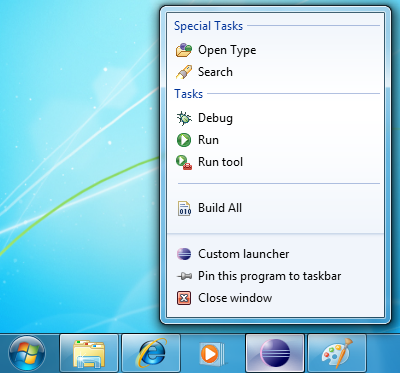
Eclipse 3.6 (also called Helios) was just released the other day and with a new release of Eclipse comes a new release of SWT (the underlying widget framework). Among the many release notes you’ll find “Eclipse 3.6 SWT News and Noteworthy” outlining core SWT improvements.

Especially one of the improvements was of interest as I see how it could be used to improve Lotus Notes, the interaction with the OS and in turn the usability of the client. The feature is about the program representation in the program list normally shown in the bottom of the screen. Below are some samples. I could see this used to give feedback about unread e-mails, pending IM’s, progress of overall replication etc. Interesting stuff (see “TaskItem overlay image / text / menu / process” in the release notes).

How the new iPhone OS may expand the use of Lotus Traveler

For all us iPhone affectionados today was a day of joy as iOS4 arrived in iTunes. There are numerous nice features in iOS4 but the most important from a Lotus perspective is the fact that iOS4 allows multiple ActiveSync accounts (or as the iPhone calls it: “Exchange accounts”). This means that you may use you iPhone with multiple mail systems whether that be multiple Lotus Traveler systems or Lotus Traveler and another mail system such as Google mail or Exchange. Very nice.

I just tried it out with the demo Lotus Traveler from Greenhouse at traveler.lotus.com and it works like a charm.

MyWidgets just got better – Option to specify a custom widget icon for sidebar

Please note: The following is from the release notes of Notes 8.5.2 so I don’t take credit for writing this. Lotus Notes 8.5.2 is in beta and there are no guarantees that the features described here will be in the final product that IBM ships.

Power users and administrators can add a new viewImageUrl attribute to the palleteItem element in a widget’s extension.xml definition to specify a custom icon to use in the sidebar view/title bar for that widget. The viewImageURL attribute value must be a URL to the desired image, for example:

viewImageUrl="http://my.server.com/myImage.ico"

Example widget XML syntax is shown below:

<?xml version="1.0" encoding="UTF-8"?>
<webcontextConfiguration version="1.1">
<palleteItem allowMutlipleSidebars="true"
contributeToSideshelfOnStartup="false"
id="1140471160" viewImageUrl="http://my.server.com/myImage.ico"
imageUrl="http://www.google.com/favicon.ico"
providerId="com.ibm.rcp.toolbox.web.provider.WebServicesPalleteProvider"
title="Google Search" url="http://www.google.com/" >

MyWidgets just got better – Option to set default widget double-click action

Please note: The following is from the release notes of Notes 8.5.2 so I don’t take credit for writing this. Lotus Notes 8.5.2 is in beta and there are no guarantees that the features described here will be in the final product that IBM ships.

You can now set a default double-click action to open widgets in the sidebar, a new window, a float window, or a tab. The default does not impact widgets that have a pre-defined double-click action defined in their XML. The supplied default is newWindow.

Note: See Tech Note 1399534 “Adding a widget custom double-click action” for information about customizing an individual widget’s double-click action. (Red: I was unable to find this technote – maybe it hasn’t been published yet).

This change enables the control of what action is taken when you double click on a widget in the My Widgets sidebar panel. The default will act on all widgets that do not already have a pre-defined double click action. The new plugin_customization.ini file preference is

com.ibm.rcp.toolbox/doubleClickAction=<option>

where valid values for <option> are:

  • sideBar
  • newWindow
  • float
  • tab

For example, to set the default double-click action to open the widget action in the sidebar, add the following statement to the user’s local plugin_customization.ini file:

com.ibm.rcp.toolbox/doubleClickAction=sideBar